Android 17 Translucent UI & Blur Effects | Liquid Glass Look
bigsansar | Jan. 28, 2026
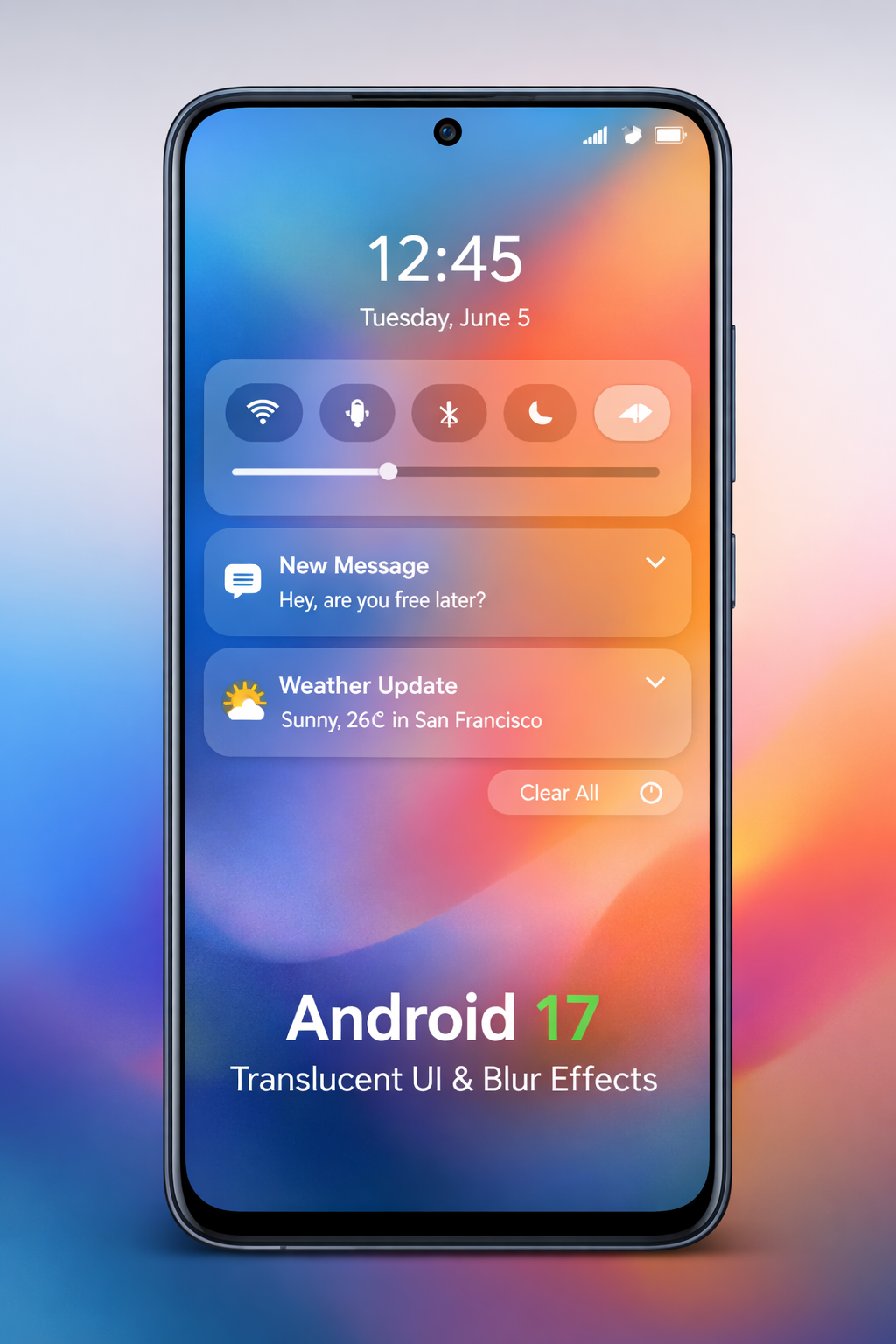
Android users are excited about the upcoming Android 17, which could introduce system-wide translucent UI with blur effects, bringing a fresh, modern look to Android devices. While inspired by Apple’s Liquid Glass design, Android 17 maintains its own subtle, refined approach.
What is Translucent UI and Blur?
Translucent UI allows background elements to subtly show through the foreground. When combined with blur effects, it creates a layered depth and improves focus on important content.
For example, opening notifications will show a faint, blurred wallpaper behind them, giving the interface a premium, modern feel.
Key Benefits:
- Enhanced Visual Depth: Layers create a cleaner, more elegant look.
- Better Focus: Important elements stand out against the blurred background.
- Smooth Integration: Works seamlessly with widgets, quick settings, and notifications.
Liquid Glass Inspiration
The Liquid Glass concept is known for its clean, fluid, and translucent UI. Android 17 may adopt:
- Dynamic wallpapers that interact with system menus.
- Smooth animations with translucent overlays.
- Consistent blur effects across notifications, quick settings, and in-app menus.
However, Android 17’s approach is more subtle than Apple’s, keeping the interface distinctly Android while offering a polished, layered appearance.
Verified Visual Updates in Android 17
- System-wide blur: Quick Settings, notifications, volume panel, power menu, and system controls.
- Dynamic Color integration: Blur effect adapts to wallpaper and system themes.
- Performance optimization: GPU-intensive effects optimized for mid-range and low-end devices.
- Subtle Liquid Glass inspiration: Inspired by iOS but built on Android’s Material 3 Expressive language.
Potential Challenges:
- GPU-intensive blur may slightly impact battery life.
- Ensuring uniform blur across all apps can be tricky.
- Performance-sensitive devices may require optional toggles.
Why This Matters for Users
- Better visual hierarchy: Clear distinction between foreground and background elements.
- Cleaner interface: Subtle transparency prevents menus from feeling heavy.
- Dynamic Color compatibility: Makes themes flow naturally with wallpapers.
Android 17 Design Example
Example Visual Concept:
- Volume slider panel with soft, blurred background.
- Power off panel with frosted effect.
- Quick Settings in semi-transparent cards.
- Dynamic Color tints to match wallpaper and system theme.
This provides a clear idea of how Android 17’s “layered glass” interface might look.
Android 17 Feature Summary
| Feature | Status |
|---|---|
| System-wide blur UI | Leaked, internal builds confirmed |
| Dynamic Color-tinted translucency | Yes |
| Liquid Glass-inspired design | Subtle, Android style |
| Blur in third-party apps | Not confirmed |
| Full redesign | No — incremental visual polish |
Android 17’s blurred and translucent UI brings a modern, layered, and immersive experience. While inspired by Liquid Glass, it maintains Android’s distinct identity, balancing style and functionality. Android users are excited about the upcoming Android 17, which could introduce system-wide translucent UI with blur effects, bringing a fresh, modern look to Android devices. While inspired by Apple’s Liquid Glass design, Android 17 maintains its own subtle, refined approach.
0 COMMENTS:
Google Adds AutoFDO to Android Kernel for Faster Phones
Discover how Google’s AutoFDO optimization improves Android performance, boosts app speed, and exte…
Google Highlights AI Models for Coding Android Apps
Google highlights powerful AI models that help developers code Android apps faster, improve product…
Android 17 Beta Program Now Live for Pixel Devices (How to Install + Supported Models)
Google has launched the Android 17 Beta program for Pixel devices. Check supported models, how to i…
Android 17 Beta Program: Features, Performance Tools & Compatible Pixel Models
Google has released Android 17 Beta 1 under the Android 17 Beta Program. Here’s what’s new, includi…
Google Releases First Android 17 Beta: Features, Supported Devices & Release Date
Google releases Android 17 Beta 1 with performance upgrades, better foldable support, media improve…
Android 17 Translucent UI & Blur Effects | Liquid Glass Look
Discover Android 17’s new translucent UI with blur effects, inspired by Liquid Glass, delivering a …
Android 17 Features: Confirmed Updates & What’s Coming Next
Discover all confirmed Android 17 features, expected improvements, and rumored updates like Cinnamo…
Gemini AI on Android: Talking to Phones in 2026
Explore how Google’s Gemini AI will transform Android, enabling more natural voice interactions and…
Android Auto Wavy Progress Bar Update: Enhanced Media Playback Interface
Discover Android Auto’s new wavy progress bar that transforms media playback. See music and podcast…
Android 16 QPR2 Update: Personalization, Smart Notifications & New Features Explained
Explore everything new in the Android 16 QPR2 update, including custom icon shapes, improved dark t…