Android Auto Wavy Progress Bar Update: Enhanced Media Playback Interface
bigsansar | Dec. 23, 2025
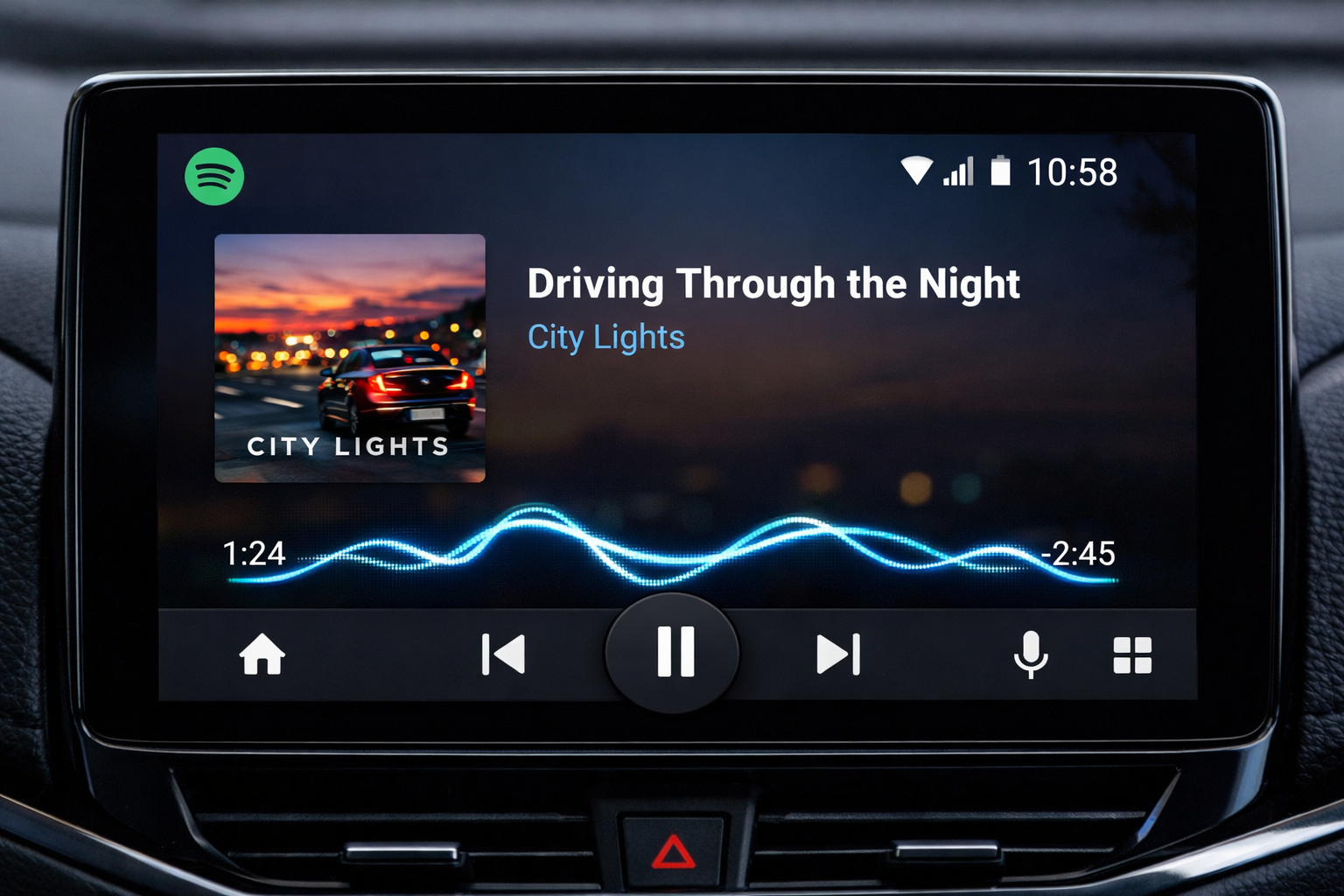
Recently, Android Auto introduced a new feature for its media playback interface: the wavy progress bar. This update aims to provide a more interactive and visually appealing way for users to track their music or podcast playback while driving.
The wavy progress bar replaces the traditional straight-line progress indicator with a gently animated, wave-like design. This not only makes it easier for users to understand the progress of the track but also adds a modern and stylish touch to the user interface. The subtle animation allows users to see at a glance how far along a song or podcast is, creating a more engaging in-car experience.
The update reflects Google’s effort to align Android Auto’s interface with Material Design 3, bringing a consistent, modern, and smartphone-like visual experience to the car environment. Applications such as Spotify and YouTube Music are expected to adopt the same progress bar style in the future, providing a uniform experience across apps.
From a user perspective, once the update is active, the progress bar will animate according to the playback of music or podcasts. The Play, Pause, and Skip buttons remain unchanged in functionality, but the wavy progress bar enhances the visual experience, making the interface more lively and easier to interpret while driving.
In conclusion, the wavy progress bar represents a subtle yet significant improvement to Android Auto’s media playback interface. While the update is not yet publicly available to all users, early evidence suggests that Google is preparing for a future rollout. This design enhancement offers a modern, interactive, and visually appealing experience, making Android Auto more engaging and enjoyable for drivers.
0 COMMENTS:
Google Adds AutoFDO to Android Kernel for Faster Phones
Discover how Google’s AutoFDO optimization improves Android performance, boosts app speed, and exte…
Google Highlights AI Models for Coding Android Apps
Google highlights powerful AI models that help developers code Android apps faster, improve product…
Android 17 Beta Program Now Live for Pixel Devices (How to Install + Supported Models)
Google has launched the Android 17 Beta program for Pixel devices. Check supported models, how to i…
Android 17 Beta Program: Features, Performance Tools & Compatible Pixel Models
Google has released Android 17 Beta 1 under the Android 17 Beta Program. Here’s what’s new, includi…
Google Releases First Android 17 Beta: Features, Supported Devices & Release Date
Google releases Android 17 Beta 1 with performance upgrades, better foldable support, media improve…
Android 17 Translucent UI & Blur Effects | Liquid Glass Look
Discover Android 17’s new translucent UI with blur effects, inspired by Liquid Glass, delivering a …
Android 17 Features: Confirmed Updates & What’s Coming Next
Discover all confirmed Android 17 features, expected improvements, and rumored updates like Cinnamo…

Gemini AI on Android: Talking to Phones in 2026
Explore how Google’s Gemini AI will transform Android, enabling more natural voice interactions and…
Android Auto Wavy Progress Bar Update: Enhanced Media Playback Interface
Discover Android Auto’s new wavy progress bar that transforms media playback. See music and podcast…
Android 16 QPR2 Update: Personalization, Smart Notifications & New Features Explained
Explore everything new in the Android 16 QPR2 update, including custom icon shapes, improved dark t…